Force Sansa View in MTP or MSC mode
The Sansa View is a great MP3/video player but SanDisk could have improved the way the operating mode is chosen. You can either work with Windows Media Player and sync your music from there (MTP mode). Or you if you prefer dragging/dropping files you can work from Windows Explorer (MSC mode). I prefer MSC mode myself.
MSC = Mass Storage Class
When you connect your Sansa View to the USB port, it can operate in either MTP mode or MSC mode. You can temporarily switch between these two modes by activating the hold switch and holding the left button of the wheel prior to plugging in your View.
If you want to permanently change the mode used when plugging it in without the need to override it each time, you can do the following (Please not that I wrote this for Windows XP, but it is the same for Windows 7).
Ensure the player is already plugged in. Don't unplug it until you are done.

Open Device Manager (Start; Run; devmgmt.msc; OK).
Your Sansa View may currently be in MSC mode or in MTP mode. Look under Portable Devices and check for the presence of a Sansa View entry. If it is present, it is operating in MTP mode. If it is not present, it is currently in MSC mode. In that case, look under Universal Serial Bus Controllers and look for the presence of the Sansa View there.
Either way, right-click on it and select update driver.
In the wizard, selected the option Install from a list or specific location; click Next. Then select Don't search. I will select the driver to install. and click Next.
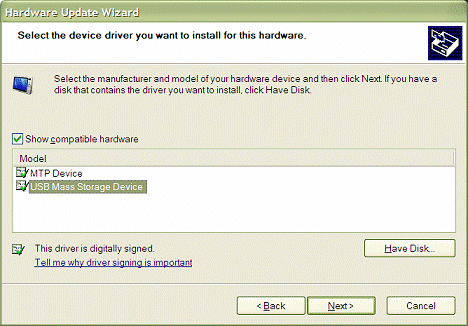
Select the option you want: USB Mass Storage Device if you want the player to work in MSC mode (Windows Explorer drag/drop) or MTP device if you want the player to operate in MTP mode (sync with Windows Media Player). Click Next.
The correct driver will be (re-)installed. It may succeed or it may fail with the warning that the device couldn't start. If the device does not work, try unplugging it and plugging it back in, or even reboot your machine.
It should be noted that once you have selected a way to copy music onto the View, you should stick with it. If you switch modes, you cannot access the files that were copied onto the device in the other mode.
Plus, one other thing that is worth considering is that in MSC mode you seem to be unable to use play lists. Despite the fact that I prefer MSC mode, I find this the single biggest drawback of this mode.
Comments
Thanks! helped me out with installing Rockbox
Glad it helped!