Microsoft Bluetooth Notebook Mouse 5000
Since my Microsoft Wireless Notebook Presenter Mouse 8000 had suffered after it slipped from my briefcase and hit the gravel, I thought I'd try another Microsoft bluetooth mouse. I purchased the Microsoft Bluetooth Notebook Mouse 5000. What attracted me is that it does not require the separate bluetooth transceiver but works with the built-in bluetooth from my laptop, once the two have been paired.
Photos: Microsoft
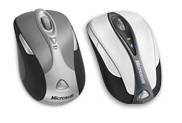
The Wireless Notebook Presenter
Mouse 8000 (left) and the
Bluetooth Notebook Mouse 5000
(right)
The form factor is similar, they are both small devices. They both come with carrying cases (the Presenter with a hard case, the 5000 with a soft case). The scroll wheel is a lot more useful than the one from the Presenter Mouse, which always caused the page to fly by instead of scroll by, no matter how I adjusted the properties.
The biggest drawback of the 5000 became immediately clear: the buttons cannot be customized. I still had the Intellimouse software 6.2 installed because of the Presenter mouse, but the 5000 does not require this and it cannot be selected from the drop down menu (in itself not a big deal).
The left auxiliary button (the only auxiliary button) is fixed as the browser's back button and the scroll wheel does not do anything besides vertical scrolling. So effectively, the left auxiliary button is useless unless you are working in a browser.
Microsoft refers to this Bluetooth Notebook Mouse 5000 as a "basic bluetooth" mouse. The price was not much lower than what I paid for the Wireless Notebook Presenter Mouse 8000 with all of its options. It lacks a second auxiliary button, and a way to configure any of the buttons (how hard would that have been to implement that).