Update to the latest Flash player 9.0.124.0
Update Player
If you have not already done so, you should upgrade to the latest Flash player. Last month, a critical vulnerability was discovered in Adobe Flash Player 9.0.115.0 and earlier, and 8.0.39.0 and earlier. By default, the Player will check for updates but that may not be soon enough, you might want to do that as soon as possible.
See:
Adobe Flash Player download center
Security Bulletin APSB08-11 — Flash Player update available to address security vulnerabilities
Don't forget to uncheck the checkbox for Google Toolbar on the Download Center page if you are not interested in downloading and installing this. Adobe really should not check this by default, forcing people to install software they may never use and that ultimately may contain security vulnerabilities in itself.
Change your privacy settings
On broadband the download only takes seconds. When you are done, be sure to go to the Settings Manager. For some reason, the Flash privacy settings cannot be altered through some control panel applet as you would expect. After all, it is installed on your computer. Instead, you will need to go out to the Macromedia website to call up the setting manager. However, you really should, since the default settings are rather liberal. Be sure to verify the settings on all tabs for use of microphone and camera, hard drive space usage, etc.
Below are my settings:

1/6: To be on the safe side, I set this to always deny.
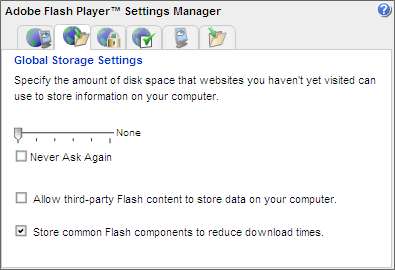
2/6: I don't want any surprises so I changed the use of hard
drive space too. I have no control over the content stored on my
drive!
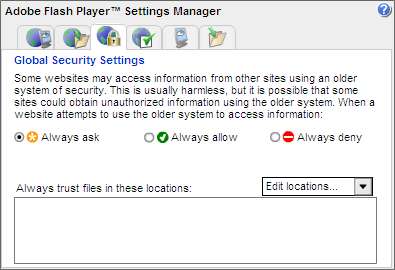
3/6: Make sure you do not set this to always allow.
It is better to use the exceptions on screens 5 and 6.
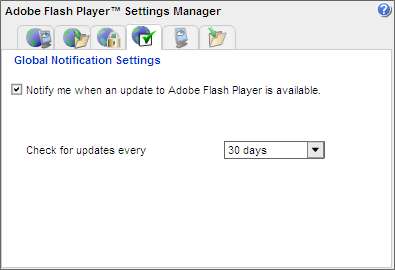
4/6: Set this to whatever you think is suitable. The default is fine.
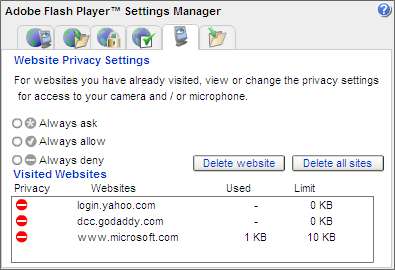
5/6: This allows you to make exceptions.
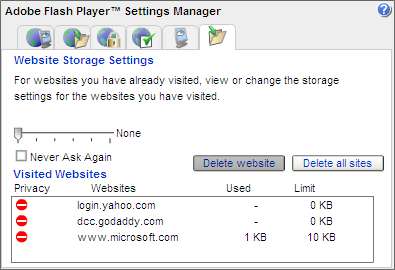
6/6: This allows you to make exceptions.