Taming floating images in Drupal content

Sometimes you need to position an image right or left, using the CSS float property. But the problem is that by merely using float: left or float: right inside a <div> containing the image, the remainder of the page may not always start under the bottom edge of your image. The <div> is not stretched to match the height of the image and the remainder of the page will want to float around the <div> containing your image like so:

The CSS used for the <div class="r"> containing the image:
.r {
  float: right;
  padding-left: 0.6em;
  margin: 0.8em 0pt;
  text-align: right;
}
So merely using float is not sufficient. We need to use a minor hack to make the browser render it the way we want. We will add an empty clearing <div> after our text so that the remainder of the page is rendered below the image and the text. Look at the improvement:
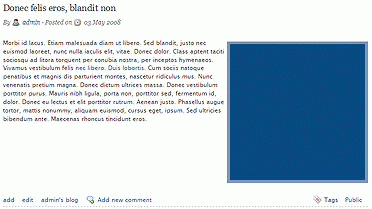
The clearing <div> can be added after the body text and can remain empty:
<div class="clear"></div>It relies on the following CSS:
.clear {
  clear: both;
  margin: 0pt;
  padding: 0pt;
}
So far, this holds true whether we are using the Drupal content management system or not. With Drupal we can modify the theme's node template node.tpl.php so that the clearing <div> is written right after the main content. Look for the line where the content is written, and add a line after it:
<?php print $content; ?>
or
<?php print $content; ?>
And you don't have to worry about it.
Comments
I am extremely impressed with your writing skills as well as with the layout on your blog. Is this a paid theme or did you modify it yourself? Anyway keep up the nice quality writing, it is rare to see a great blog like this one today..
wesdf
Thanks. It's a customized sub theme on top of Marinelli.